
PitchKraft Support

Mail Dashboard

Dashboard

After your campaign emails have been sent, the dashboard becomes your command center for monitoring engagement and results. These analytics let you gauge the effectiveness of your outreach and can guide your next steps, like who to follow up with.

Accessing the dashboard

Open Mail → Dashboard and select one or more campaigns and a sender to see the relevant metrics. Choose Today, Last 24h, Yesterday, Last 7 days, Last month, All time or Custom. Check the selected date range rather than assuming the report includes all dates. Keep the campaign, sender, dates and ‘Only guaranteed’ setting consistent when comparing results.
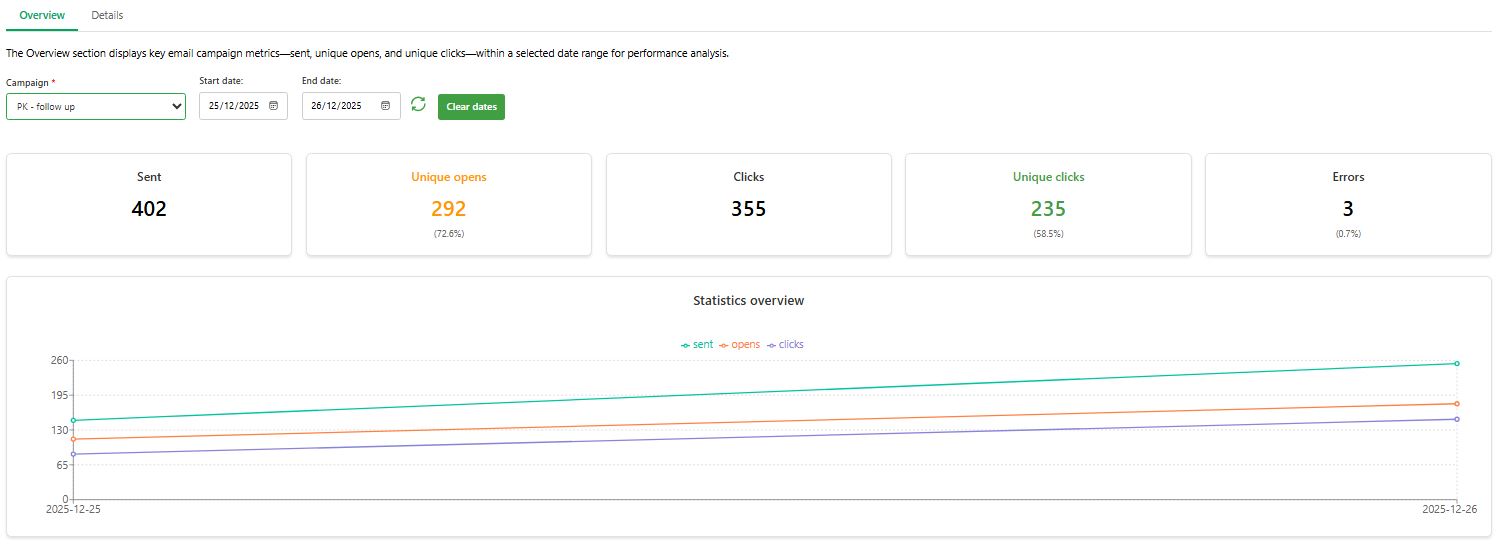
Mail Dashboard overview graph

At the top of the Overview tab, you will see high-level metrics. These include:

  • Sent: the number of emails sent within the selected campaign, sender and date filters. Check errors and bouncebacks separately when assessing delivery.
  • Unique opens: emails with at least one recorded open, rather than counting repeated opens of the same email as separate unique opens. For example, 182 out of 350 sent emails is 52%. Recorded opens are not automatically proof that a person read the email; the Only guaranteed setting affects the reported figures.
  • Clicks: recorded link-click activity. Repeated clicks can contribute to activity totals.
  • Unique clicks: the distinct recipients represented in the click figures, rather than counting the same recipient repeatedly. For example, 35 out of 350 is 10%. Automated activity and the Only guaranteed setting must be considered when interpreting clicks.
  • Errors, Bounceback and Auto replies: review these alongside engagement to understand sending failures, returned mail and automated responses. An auto reply is not the same as a personal reply.

The Overview graph shows activity over time, including sent emails, opens and clicks. Use it to see when activity occurred, and keep the same filters when comparing periods. A spike in recorded activity alone does not establish a spike in human interest.

Don’t be fooled:

PitchKraft gets higher rates of opens and clicks. Of that there is no doubt. Beware other platforms that show high opens and clicks because they haven’t taken into account bots that now routinely open and click emails. Apple started it with their Apple Privacy Protection (APP) that opens and clicks all emails before the recipient has even seen your email, whether it sits in the inbox or not. PitchKraft allows you to filter the results.

With ‘Only guaranteed’ checked, the analytics show opens and clicks that are not attributed to mail servers automatically opening and clicking received emails. Those same emails may later be genuinely opened and clicked by actual users, but those later interactions cannot be guaranteed and may also be omitted.

The Only guaranteed figures are therefore very pessimistic, conservative numbers and can understate actual engagement. A contact missing from the filtered results may still have read or clicked the email. Turning the filter off does not make all recorded events confirmed human actions.

Read more: Why Email Opens and Clicks Can’t Be Trusted.

The data in the Dashboard can help guide your next steps when you interpret it alongside the actual conversation:

  • Contacts with stronger engagement signals: review repeated opens or clicks alongside replies, previous conversations and the Only guaranteed setting. Where the evidence supports it, prioritise a useful follow-up, a call or a LinkedIn message. You can prepare a shorter follow-up email in PitchKraft and choose whether to include the email trail.
  • A recorded open without a click: consider whether a brief follow-up would help. It does not prove the recipient read the message or explain why they did not act. Use the contact’s history and your normal follow-up timing rather than assuming interest.
  • No recorded open: the message may be unseen, tracking may not have captured the activity, or genuine activity may be omitted by Only guaranteed. Do not treat this as proof of disinterest. Review delivery status and consider a different subject or approach where appropriate.
  • Tracking conversions: if your email links to a sign-up page, webinar registration or another conversion, review those outcomes in your own system. Compare registrations or other completed actions with your campaign and click data to assess the resulting conversion rate. A click alone is not a completed conversion.

Tips and tricks

Use the Dashboard to identify contacts worth reviewing for follow-up. Combine open and click signals with replies, source context and delivery results. Test subject lines and outreach approaches using consistent reporting filters, and judge success by useful conversations and completed outcomes as well as tracked activity.

Switch to Details for the individual records behind the totals.
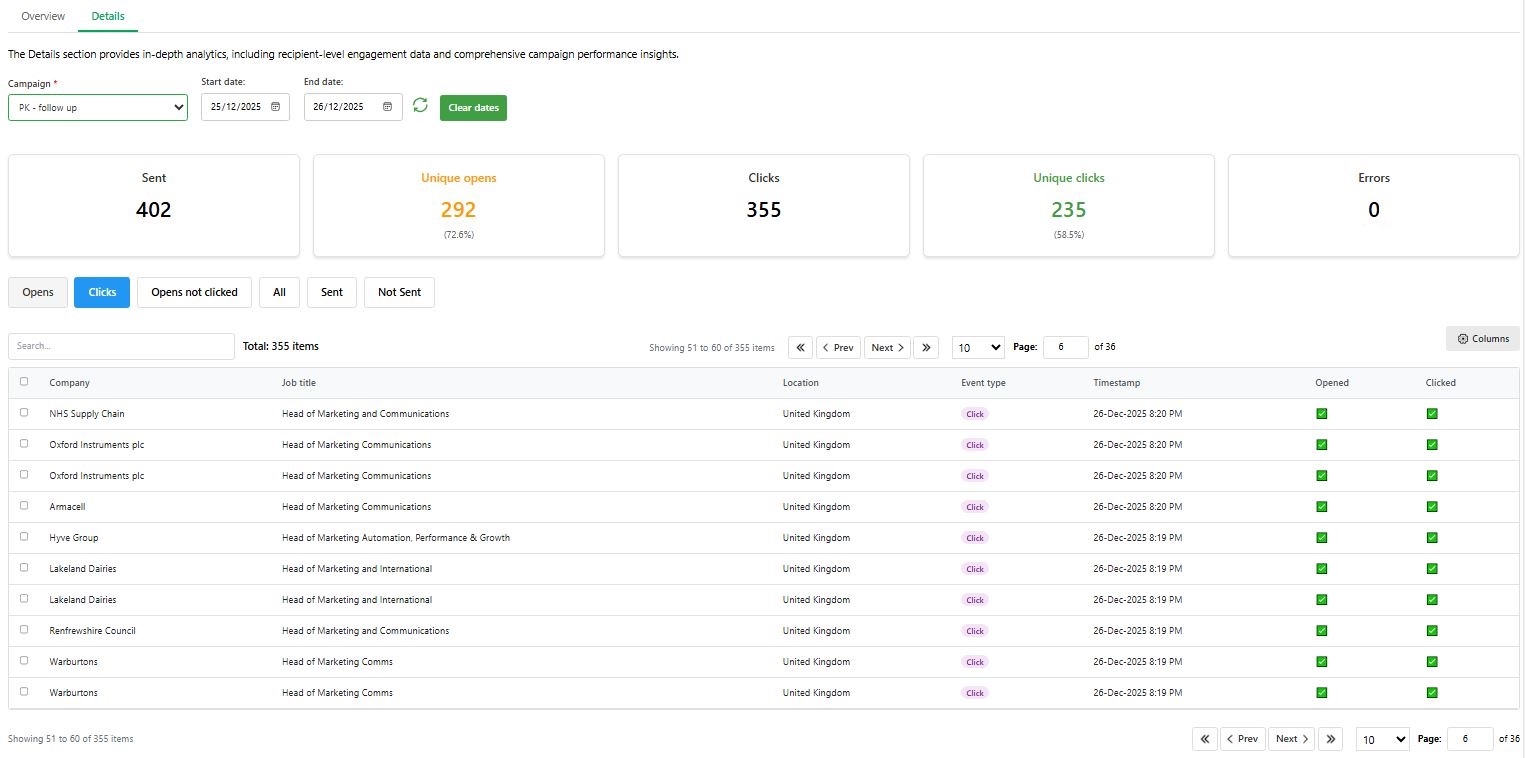
Mail Dashboard details table

Inspect the available contact and activity information, such as contact name, email address, company, job title, location, event type and timestamp. Use Search and Columns to find and display the information you need.

Choose a category: Opens, Clicks, Opens not clicked, Opens & clicks, All, Sent, Bounceback or Not sent. Read the results using the selected campaign, sender, dates and Only guaranteed setting. These records show tracked activity, not a guarantee of a person’s intent.

Use Export Report to export the reporting data. Record the filter choices with the report so that colleagues interpret the figures consistently.

To organise contacts for a later follow-up campaign, identify the relevant contacts from the report, open them in Contacts and use the selection toolbar’s Segment action. Review the membership, then choose the segment in the follow-up campaign’s List / view / segment field. A saved view is useful when you want membership to follow changing filter conditions instead.

Celebrating your success!

Don’t forget to celebrate your wins! If your campaign performed well, that’s a direct result of your effort combined with PitchKraft’s technology.  Compare your own reply and conversion results with previous campaigns to see what has improved. Share the success with your team. Let us know. We love testimonials and could feature your story to help boost your brand.

By now, you’ve learned how to manage contacts, create blueprints, generate personalized emails, send them, and review engagement. You’re equipped to run sophisticated email campaigns that feel warm and fantastically hyper-personal to your future customers.

Tips and tricks

Celebrate strong results with your team and reuse high-performing campaigns as proven templates for future outreach.

Let’s talk about your personalised outreach

Get in touch with our PitchKraft specialists to discuss your email personalisation and outreach requirements.

Send us a message

Phone Support