
PitchKraft can generate hyper-personalized emails using all system and custom CRM fields, contact notes, previous emails, LinkedIn information, online research and your organisation’s knowledge base.
These sources help PitchKraft understand the recipient, your relationship with them and why your offer could matter. The entire email is generated uniquely for each contact, with different sentences drawing on the relevant information available.
You can inspect that information before sending. Sources appear in the email’s Insights section and are stored at contact level. Hovering over parts of the email opens a pop-up showing the elements behind the personalized sentence, including clickable URLs for online sources.

Which sources can PitchKraft use?
| Source | Information it can provide | How it can influence the email |
|---|---|---|
| System and custom CRM fields | Role, employer, location and any additional information you record | Shapes the message’s focus, recommendations and wording |
| Contact notes | Conversations, feedback, requirements and observations | Acknowledges previous interactions and recorded needs |
| Email history | Earlier questions, replies, objections and commitments | Continues the conversation from the appropriate point |
| LinkedIn information | Professional background, profile details, activity and communications | Connects the message to the recipient’s professional context |
| Online research | Relevant public information about the person and their organisation | Establishes a specific connection between the prospect and your proposition |
| Organisation knowledge base | Products, services, case studies, testimonials and programme information | Selects the parts of your offer most relevant to that recipient |
Case study: one invitation, several sources
Our example follows an existing PitchKraft email promoting the 2025 European Women in Technology event to Aakanksha Utkhede, Software Engineer II at Toast in Dublin.
The invitation acknowledges her positive experience at the previous event, includes research about her employer and recommends a practical software-development workshop.
Each detail contributes to the reason for inviting her. Her role provides professional context. A saved note establishes her previous connection with the event. Research about Toast adds organisational relevance. The event programme supplies the workshop being recommended.
This is a historical email example. Additional custom-field and email-history scenarios below illustrate how the same campaign could use further information.
The six areas below form part of this case study. Each explains how a different source contributes to Aakanksha’s invitation, with additional CRM-field and email-history scenarios showing how the same campaign could develop.
CRM fields: personalize emails using recorded contact data
PitchKraft can use every system field and any custom field you create when generating an email.
System fields provide details such as name, job title, employer and location. Custom fields supply information specific to your business, such as a product of interest, current supplier, renewal date or area of responsibility.
A field can influence the argument in the email as well as its wording. Its value does not have to be copied directly into a sentence. It may help determine which benefit to explain, which example to select or what question to ask.
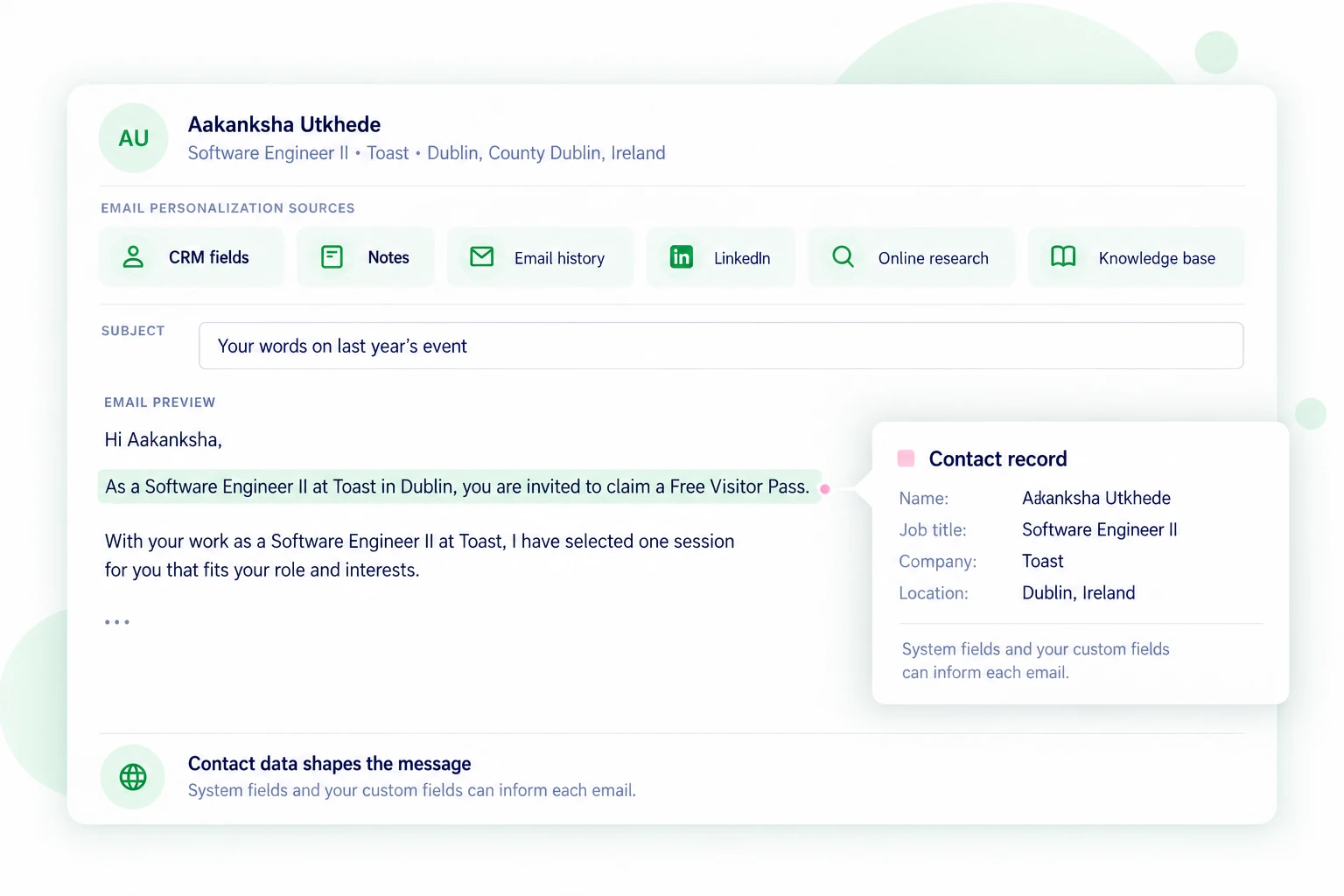
Example: Aakanksha’s role, company and location
The invitation uses her recorded professional details:
“As a Software Engineer II at Toast in Dublin, you are invited to claim a Free Visitor Pass…”
Her role also helps explain why practical software-development content could be relevant.
An organiser could add a custom field such as “Session interest: practical AI development tools” and use it to inform recommendations. That is an illustrative field, rather than one shown in this case study.
Contact notes: personalize emails using previous feedback
PitchKraft can use notes saved against a contact to inform their next email.
Notes may contain feedback, requirements, meeting details or a request to revisit a discussion. They preserve information learned through interaction that might otherwise depend on someone remembering it.
A relevant note can shape the opening, explain why you are following up or help identify the right offer.
Example: acknowledging her previous event experience
The invitation says:
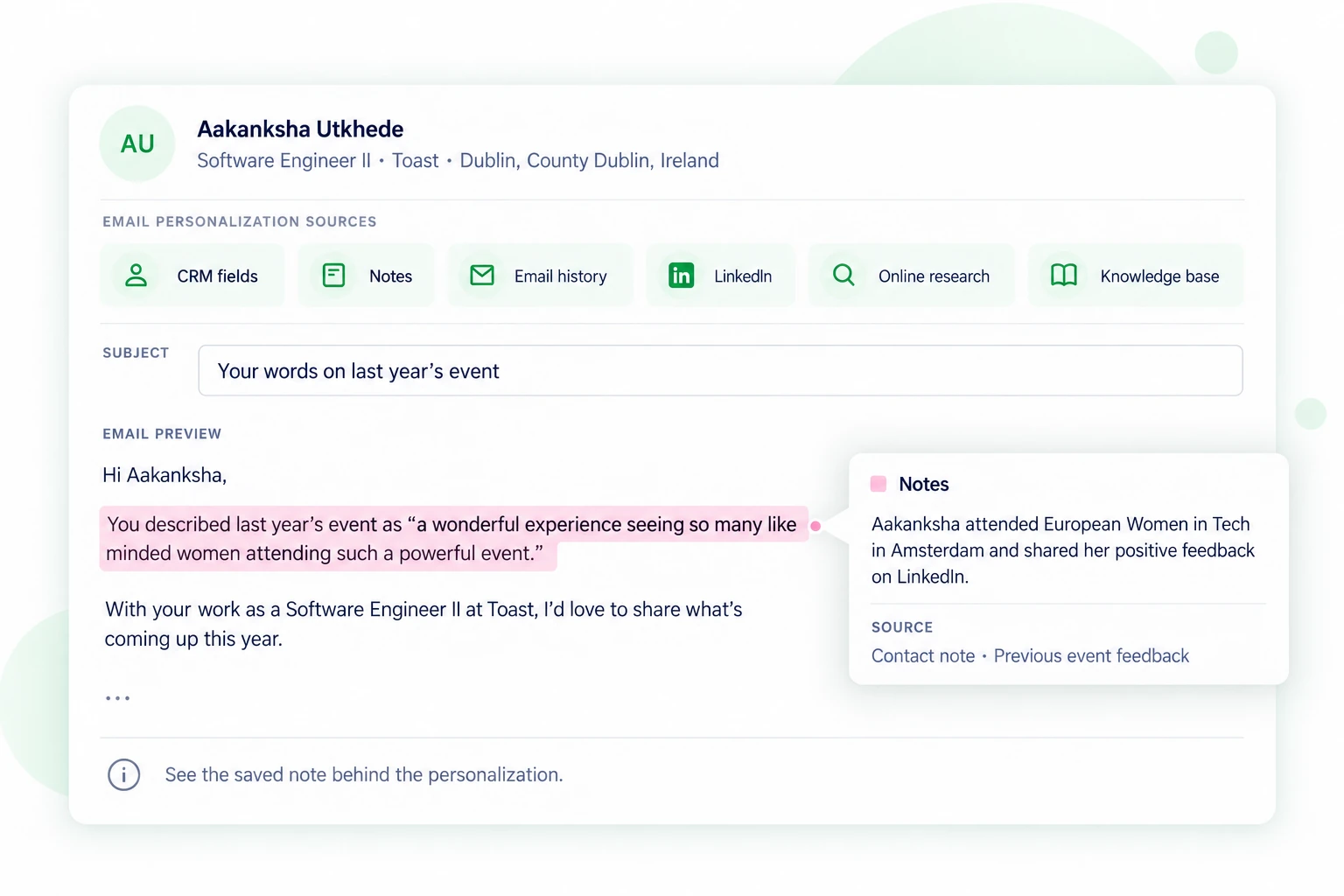
“You described last year’s event as ‘a wonderful experience seeing so many like minded women attending such a powerful event.’”
A saved contact note records Aakanksha’s attendance at the previous event and feedback she shared on LinkedIn. The sentence acknowledges her own experience and gives the invitation a personal starting point.
Although the feedback originally appeared on LinkedIn, the source used here is the note recorded against the contact. Hovering over the sentence reveals that note.
Email history: generate follow-ups that continue the conversation
PitchKraft can use previous emails sent to and received from a contact when generating a new message.
Email history can reveal what the person asked, what you have already explained and which information you promised to provide. It helps the next message respond to the relationship as it stands.
An initial invitation and a reply to a specific question require different content. Previous correspondence provides the context for that distinction.
Example: responding to a question about the programme
Suppose Aakanksha had previously asked whether the programme included practical sessions about AI tools for developers.
A follow-up could begin:
“You asked about practical sessions on AI tools for developers. The programme includes a Cursor workshop focused on navigating and understanding codebases.”
The email exchange supplies the reason for mentioning the session. The programme supplies its details.
This illustrates how email history could contribute to the same campaign; it is not an exchange evidenced in the supplied screenshot.
LinkedIn information: connect the email to professional context
PitchKraft can use LinkedIn information and communications associated with a contact to personalize their email.
Profile details, professional experience and activity can help explain why a topic is relevant. A change of role may alter the appropriate approach, while a previous LinkedIn conversation can provide context for a later email.
The useful connection is between the person’s professional circumstances and the purpose of the message.
Example: identifying a relevant development session
Aakanksha’s role as a Software Engineer II provides professional context for recommending a workshop about code navigation and development tools.
That context can be combined with the organiser’s programme information. The resulting sentence explains why the session was selected for her, rather than simply listing available workshops.
Online research: connect your proposition to the prospect’s organisation
PitchKraft can use relevant public research about the contact and their organisation when generating an email.
Research may explain what the company does, which markets it serves, what it has announced or how your offering relates to its activities.
A researched fact should support the reason for writing. Its value comes from helping establish relevance, rather than merely demonstrating that the company was searched.
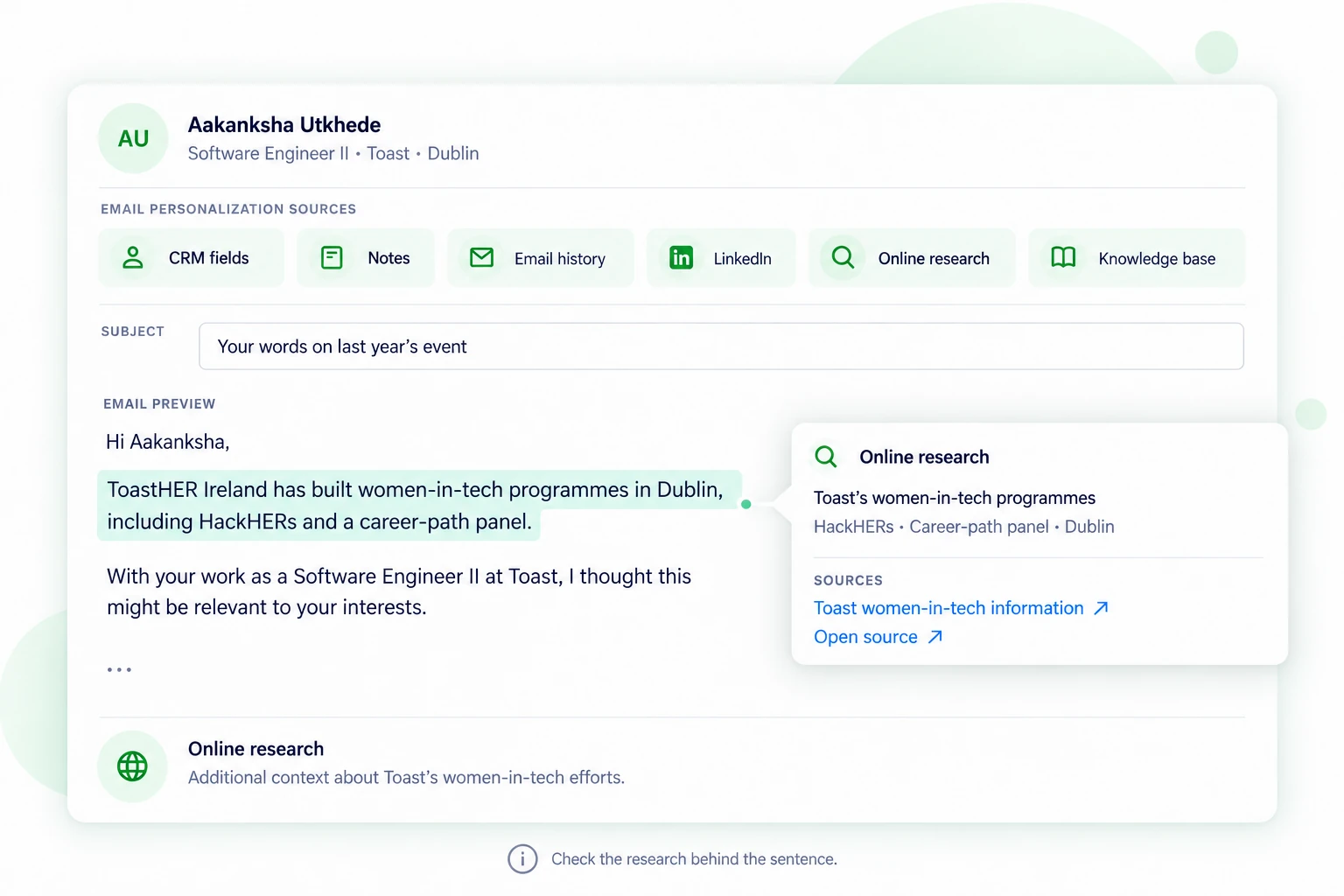
Example: Toast’s women-in-tech initiatives
The invitation refers to ToastHER’s activities in Dublin, including its involvement with HackHers and a career-development panel.
Toast’s own article describes those activities and the community’s work supporting women in technology. This provides a documented connection between the employer’s initiatives and the event’s focus.
Supporting source: Toast’s article about ToastHER Ireland.
The email also references the 2024 report’s finding that women represented 22% of Toast’s software-engineering group in Ireland. That historical figure is supported by the report.
Supporting source: Toast’s 2024 Ireland Gender Pay Gap Report.
These sources let the user check the specific claims used in the example. They establish organisational context; they do not establish Aakanksha’s personal involvement in those initiatives.
Organisation knowledge base: select relevant products, services and content
PitchKraft can use your organisation’s knowledge base to connect your offering to each recipient’s circumstances.
Your knowledge base can supply product details, services, case studies, testimonials, event programmes and other supporting information.
Combined with contact context, it helps PitchKraft select what deserves attention. A service provider might use a relevant case study. An event organiser might recommend a particular session.
Example: recommending the Cursor workshop
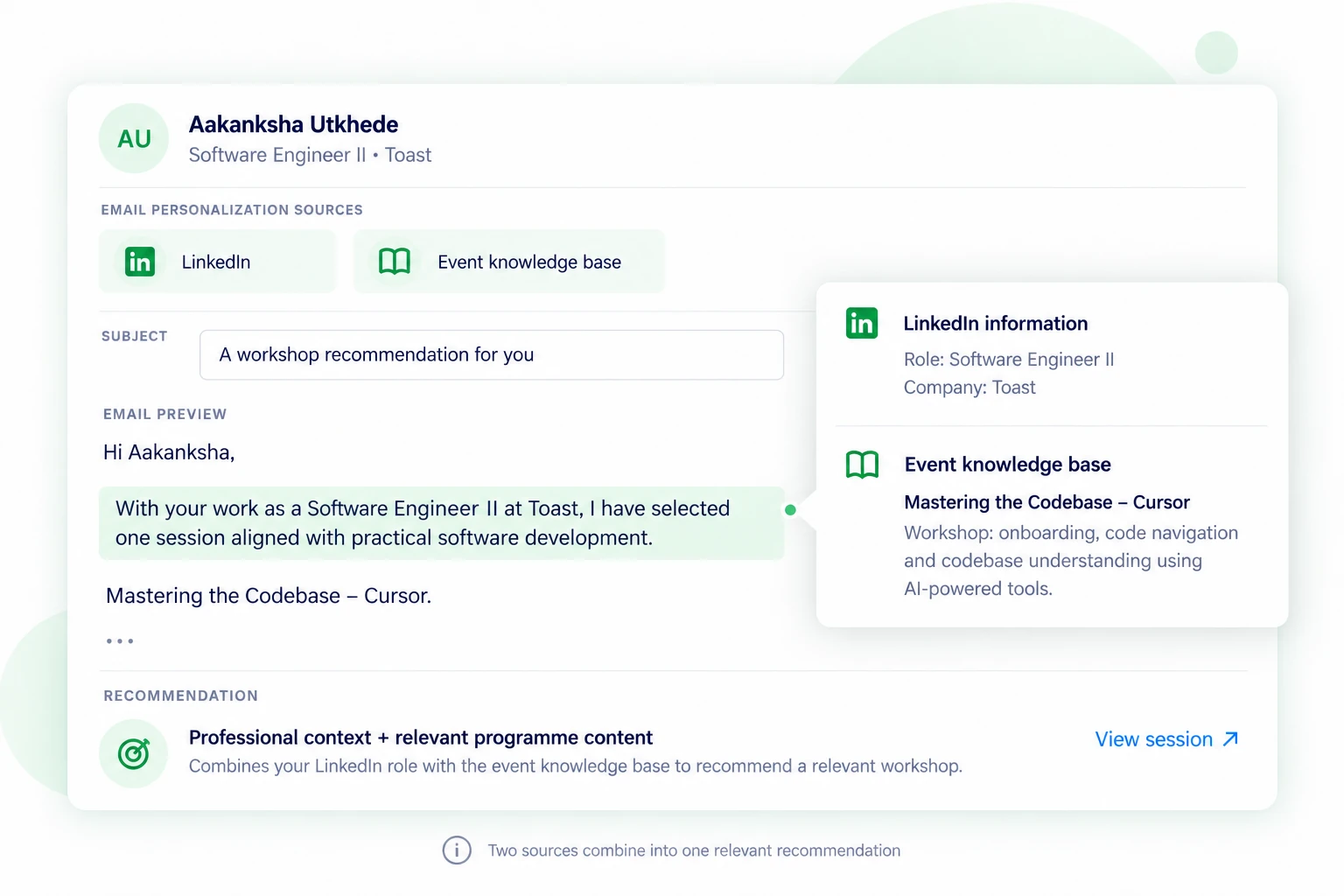
The event invitation highlights “Mastering the Codebase – Cursor”. Its description focuses on onboarding, code navigation and codebase understanding using AI-powered tools.
The email connects that programme content to Aakanksha’s role:
“With your work as a Software Engineer II at Toast, I have selected one session aligned with practical software development…”
The workshop information supplies the content of the recommendation. Her professional context supplies the reason to make it.
This shows how two sources can contribute to one personalized sentence.
How is the entire email generated uniquely?
PitchKraft generates the complete email individually for each contact. Personalization can extend through its opening, explanation, supporting examples, recommendations and call to action.
The Aakanksha email uses several kinds of relevance. It acknowledges previous attendance, adds employer context and recommends a session connected to her work. Different sentences draw on different sources.
Another contact in the same campaign may receive a different recommendation and a different reason to attend. Someone responsible for team development could be more interested in coaching or leadership content. Someone who has already asked a question may need a direct answer as the opening.
The Blueprint provides the purpose and direction. The contact information, relationship history, research and company knowledge help determine how that purpose is expressed.
How can you verify the information in an AI-generated email?
PitchKraft shows the sources behind the personalization through contact-level Insights and sentence-level hover pop-ups.
Review Insights at contact level
The Insights section behind the email shows its sources. This information is stored against the contact, keeping the research and supporting context connected to the person they concern.
You can review the information used for that recipient and understand how it contributed to the message.
Hover over a personalized sentence
Hovering over parts of the email opens a pop-up showing the source elements behind the sentence.
The original product screenshot below demonstrates this. The passage about Aakanksha’s previous-event experience is highlighted, and its pop-up displays the saved note containing that feedback.
Original product screenshot: the Notes pop-up exposes the record behind the personalized sentence.
Other passages can reveal different sources. A recommendation may combine professional information and knowledge-base content. A follow-up may draw on earlier correspondence. A company claim may come from online research.
Open online source links immediately
Where information comes from online research, the pop-up includes the actual source URLs. You can click through and check whether the supporting material substantiates the wording.
This allows you to confirm that the information concerns the correct organisation, is appropriate for the message and has been represented accurately.
Internal information can be checked too. The saved note or correspondence provides the evidence behind a reference to something the contact said.
What happens when a contact has limited information?
PitchKraft can use the relevant sources available for each contact; every source is not required for every email.
A new prospect may have useful role and company information but no correspondence. An established contact may have extensive notes and email history. Another recipient’s custom fields may provide the most useful context.
All system and custom fields can be used, but every available detail does not need to appear. The objective is to select information that supports a useful message for that individual.
Frequently asked questions
Can PitchKraft use all my custom CRM fields?
Yes. Every system field and any custom field you create can be used in email generation. The information can shape the message’s focus, recommendations and wording.
Can it use contact notes and previous emails together?
Yes. Notes and email history can both provide relationship context. A note may explain a requirement, while an email exchange shows the question the next message should answer.
Can LinkedIn information be combined with online research?
Yes. Professional information and organisational research can contribute different parts of the context used to write an email.
How does the knowledge base affect the message?
It supplies information about your own offering. PitchKraft can select a relevant product, service, case study or programme item and connect it to the recipient.
Can one sentence use several sources?
Yes. For example, a workshop recommendation can combine the contact’s professional role with session information from the organiser’s knowledge base.
Where can I see the sources?
Sources appear in the email’s Insights section and are stored at contact level. Hover pop-ups also show the elements behind personalized passages, with clickable URLs for online information.
Does visible evidence replace reviewing the email?
You can use the evidence to review the email more effectively. Source links and internal records help you check whether a claim is supported and whether the wording is appropriate before sending.
Put your contact knowledge to work
CRM fields, conversations, feedback and professional details can all contribute to a more relevant email. Online research adds external context, while your knowledge base supplies the offering and supporting material.
PitchKraft brings these sources into individual email generation and makes the information behind the personalization available for review.
Create a free PitchKraft account to try it with your own contacts, or see how PitchKraft works.
Get in touch
24/7/365 help desk support comes as standard. We know…this is not normal!

Live Chat
Chat with our support team 24/7

Email Support
support@pitchkraft.ai

Phone Support
London: +44 (0) 207 660 4243
New York: +1 (0) 315 400 2402