
Know who you’re
reaching out to.
Check the record. Confirm the employment evidence. Match the person to your audience.
Run three distinct checks on your own contact lists—and inspect the reasoning behind each result.
Built into the Contacts workspace, alongside CRM contact management and personalized email campaigns.
01Data Integrity CheckIs the record complete and consistent?↗
02Employment MatchDoes the employment evidence match?↗
03Target Audience MatchIs this the right person for your brief?↗
Separate checks. Clearer decisions.
What is B2B contact data validation?
It goes beyond verifying an email address. A mailbox can be valid while the person has left the company. A contact can have the correct job title but be outside your target industry. And an otherwise suitable decision-maker may have a malformed name, duplicate record or conflicting company information.
This is why PitchKraft provides distinct Validity Evidence Checks rather than treating every aspect of B2B data quality as one yes-or-no answer. These checks are available in your Contacts workspace whether you imported your own data or are managing contact lists already in PitchKraft.
Three checks. Three questions about every contact.
Each method looks at a different part of contact quality. Use the check that answers the question you need to resolve before your next campaign.
Data Integrity Check
Is the contact record complete and consistent?
Inspects field quality, structure and internal inconsistencies, without web searching.
Employment Match
Does this person still work there in that role?
Assesses current public evidence for the contact’s stated organisation and position.
Target Audience Match
Does this company and role match my brief?
Assesses the organisation and job function against the targeting criteria you have saved.
Employment Match: check whether the person’s job details still make sense
Does this person still work at the stated company, in the stated role?
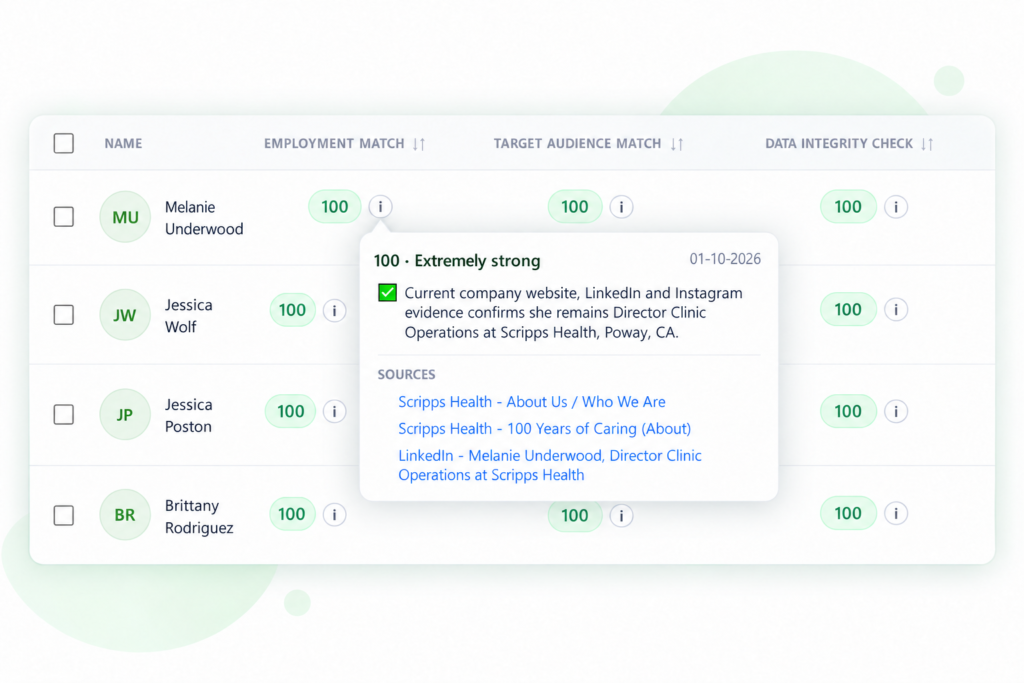
Contacts change employers, receive promotions, move departments or leave an organisation. Employment Match uses current public evidence to assess whether the company and job title in your list remain consistent with what can be established.
- Review the assessment of current company and role.
- Inspect the explanation, check date and cited evidence.
- Follow supporting source links to understand why a result was returned.
The outcome is a dated evidence-based assessment, not a guarantee that the contact can never move roles again.
Target Audience Match: validate contacts against your actual brief
Is this the right organisation and the right role for the campaign?
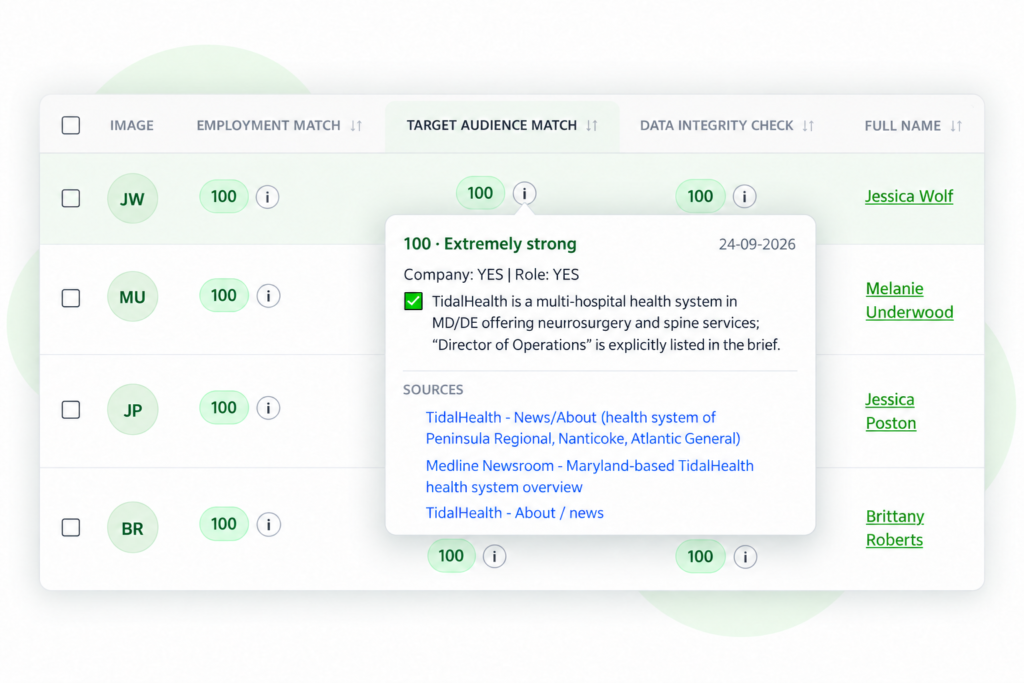
Accurate B2B data is not automatically relevant B2B data. Target Audience Match compares each selected contact against your saved targeting brief, considering company criteria and the individual’s job title or function.
- Company fit: does the organisation meet the relevant industry, geography and other criteria in the brief?
- Role fit: does the person’s function, job title or level match the contacts you want?
- Explanation: review why the result meets or falls outside the brief.
For example, an event organiser may need IT directors at qualifying companies, not every employee whose email address works. The assessment distinguishes those two questions.
Data Integrity Check: identify errors inside the contact record
Is the record structurally sound, complete and internally consistent?
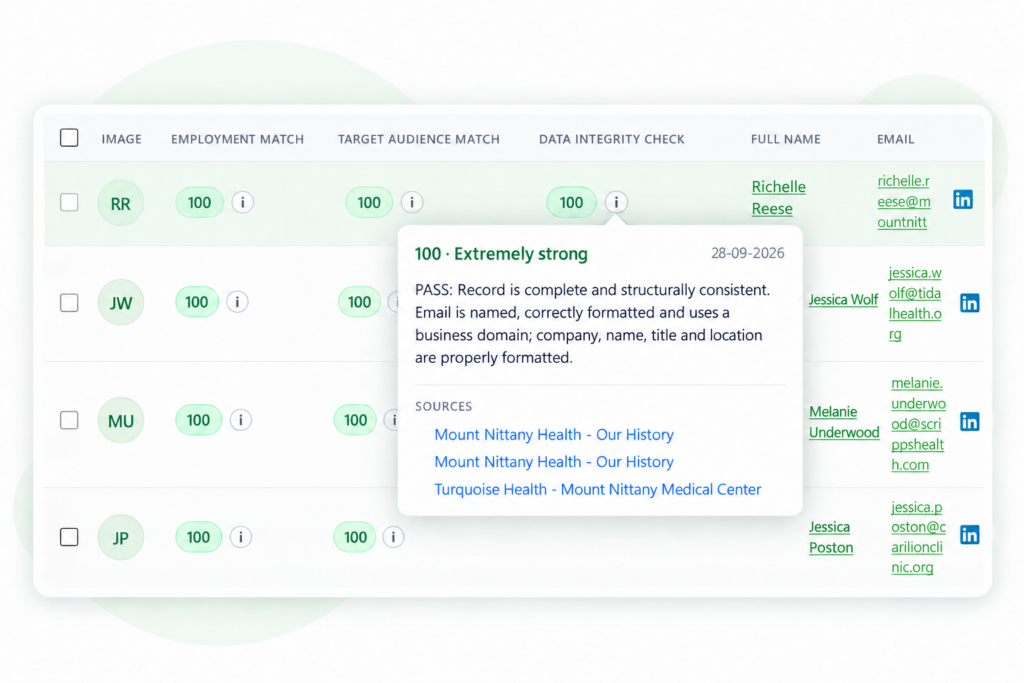
Data Integrity Check focuses on the information in the record itself, including details that can break segmentation, personalization or list management. This check does not use web search.
- Missing or incomplete contact fields.
- Generic or malformed email addresses.
- Contaminated, badly formatted or inconsistent names and job titles.
- Website and email-domain mismatches, plus duplicate records.
It is a record-quality assessment, not a guarantee that an email inbox exists or accepts messages. Use the separate Email verification option when mailbox verification is your objective.
How to validate your own B2B contacts in PitchKraft
You do not need to buy a prevalidated contact database to use the checks. Run them on a list you already own and manage in PitchKraft.
Open Contacts
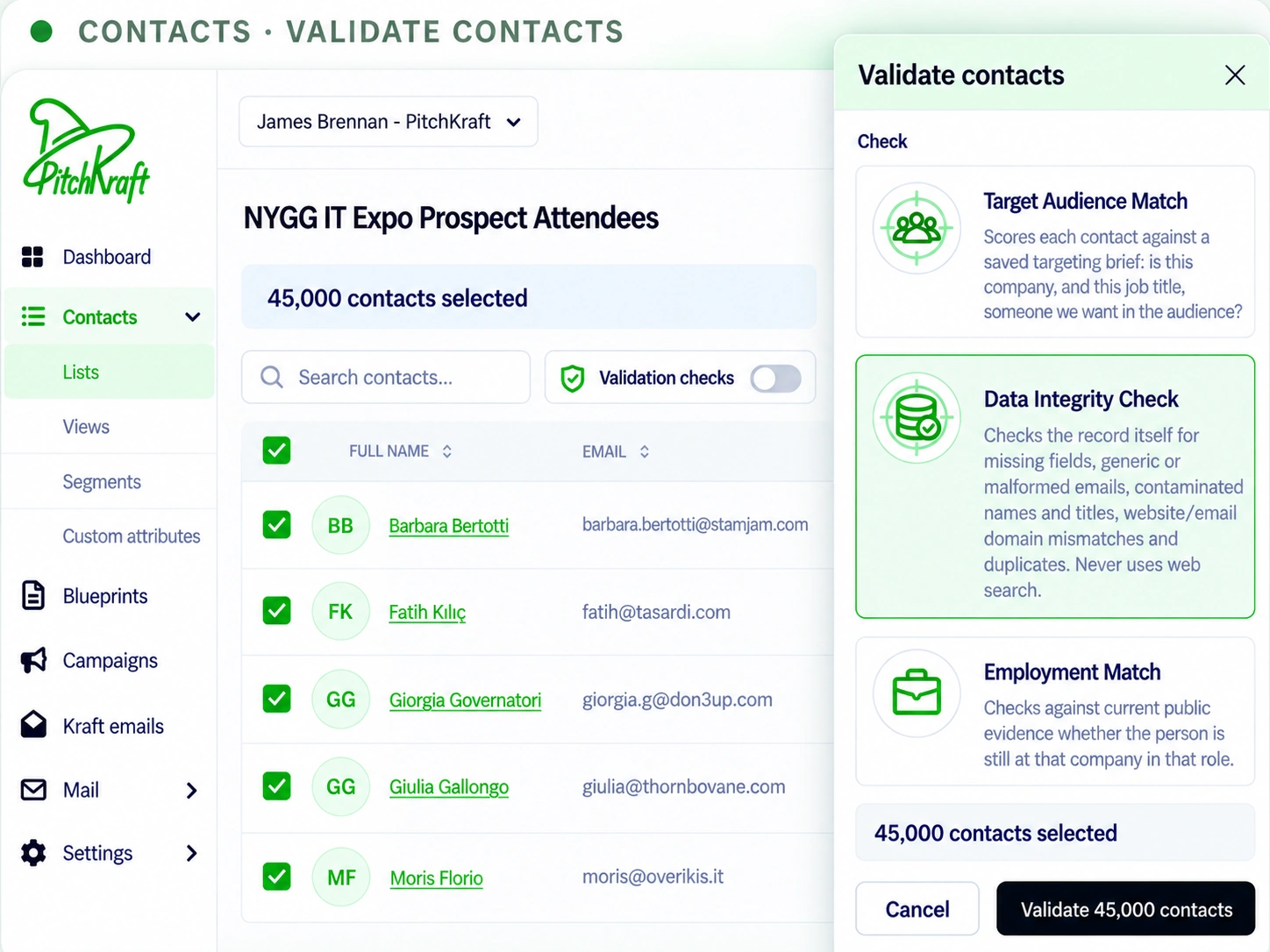
Go to Contacts → Lists in the PitchKraft left navigation.
Use your list
Open an existing contact list, or import one from Excel or CSV. Include names, company details, roles and other useful fields.
Select contacts
Choose the individual records or the group of contacts that you want assessed.
Open Validation checks
Click the Validation checks control on the Contacts list screen.
Choose a method
Select Employment Match, Target Audience Match or Data Integrity Check. For audience matching, use a saved targeting brief.
Run and review
Confirm the check, review any displayed credit information and inspect the per-contact results and Details.
Need help importing a file or using lists, views and segments? Read the PitchKraft Contacts guide.
What the validation results tell you, and what they don’t
A score is useful only if you know what was checked. PitchKraft associates assessments with individual records so you can inspect the explanation instead of relying on an unexplained badge.
| Check | What it answers | What to inspect |
|---|---|---|
| Employment Match | Is the stated employer and role consistent with current public evidence? | Outcome, explanation, check date and cited sources. |
| Target Audience Match | Does the company and person’s function meet the targeting brief? | Company fit, role fit and the reasons for the match. |
| Data Integrity Check | Is the record complete and structurally consistent? | Missing, conflicting, malformed, generic or duplicated fields. |
| Email verification (separate) | Is the email address likely to be usable for delivery? | The result of the dedicated email-verification process; it does not establish role relevance or current employment. |
Why the check date and supporting sources matter
Employment information is time-sensitive. Review the available explanation and source links to see why a result was reached, and consider how recently it was checked. A company page or public professional reference can support an employment assessment; a structural integrity check, by contrast, evaluates fields in the record rather than gathering web citations.
These checks give you a stronger basis for deciding which records to use, investigate or update. They do not eliminate the need to keep lists current or to use appropriate targeting and lawful outreach practices.
For the wider context of list quality, read why email list hygiene matters and the guide to improving email deliverability.
Who benefits from self-service B2B contact verification?
Teams that already hold large or long-lived prospect lists can validate important assumptions before selecting an audience or personalizing a campaign.
Event organisers
Check that prospective exhibitors, sponsors or attendees have the relevant functions and employers, then compare them with the event’s audience brief.
B2B sales teams
Review employment evidence for contacts in an existing pipeline before approaching someone who may have changed company or role.
Agencies and data teams
Assess a client’s uploaded dataset for brief alignment, field consistency and evidence-backed employment information before using it for outreach.
One workspace, from data quality to personalization
Validation is part of the wider PitchKraft workflow, not a separate spreadsheet service. After reviewing contacts, you can work with lists, views, segments and CRM information and use that context in your AI-personalized email campaigns. The goal is to help you decide who to contact before spending time generating messaging for the wrong person.
For a description of the evidence provided when DataJi supplies B2B data, see DataJi’s explanation of contact validity evidence. In PitchKraft, these checks can also be run by users on their own lists.
Frequently asked questions about B2B contact data validation
Can I validate B2B contact data I already own?
Yes. Import a contact list into PitchKraft, or open a list you already manage in Contacts. Select the records you want to check, choose a validation method and review the results. These self-service checks are not limited to data supplied by DataJi.
What does Employment Match verify?
Employment Match assesses current public evidence to determine whether a contact appears to work at the company and in the role shown in the record. The result provides an explanation and relevant evidence links.
How is Target Audience Match different from Employment Match?
Employment Match asks whether the person’s job information is consistent with current evidence. Target Audience Match asks whether the company and job role meet the requirements in your saved targeting brief. A contact can be correctly recorded but irrelevant to your intended audience.
What does Data Integrity Check look for?
It examines record completeness and structure, including missing fields, malformed or generic email addresses, problematic names and titles, email-domain mismatches and duplicates. This check does not use web search.
Does Data Integrity Check verify email deliverability?
No. Data Integrity Check assesses the quality and consistency of the record. Mailbox or address verification is a different check; use PitchKraft’s separate Email verification option when you want to assess email validity.
Can I run these checks on several contacts at once?
Yes. From Contacts, select the relevant records in your list, open Validation checks and choose the method you want to run. Review any displayed credit information before confirming.
Where do I see the score and supporting evidence?
Results are associated with individual contact records. Open the corresponding result or details to read the assessment, check date and linked sources for source-backed checks. Record-integrity checks explain structural issues rather than relying on web sources.
Does a passed contact validation mean the data can never become outdated?
No. Employment, roles, audience requirements and email addresses can change. Validation represents the information and evidence available when the check was run. Recheck older lists before important campaigns.
Know more about your contacts before your next campaign.
Open your PitchKraft workspace, select your contact list and run the validation checks that matter to your audience.
Last updated: 29 October 2026. Validation results reflect the records, criteria and evidence available at the time of checking. Product features and credit requirements may evolve; check the confirmation screen in your account before running a check. Related: PitchKraft product roadmap.
