
PitchKraft Support

Extra instructions & Rules

Current app workflow

The current field is Dos and don’ts → Extra instructions. Use Avoid words for unwanted phrases. Edit with Manual or Chat AI and choose Save all. Keep Extra instructions consistent with the Example message. Use <Exact>...</Exact> for exact text and <Alternative>Option 1<OR>Option 2</Alternative> for alternatives where supported, then inspect the draft.

Here you can optionally give PitchKraft specific instructions and rules to fine tune the emails it generates.

This is a very useful section. If you find something in your email that you just can’t seem to get right, then tell Pitchkraft what to do specifically in this section. You can tell it things to avoid doing as well as what it must do. 

How it looks in the current Blueprint editor

CURRENT BLUEPRINT EDITOR · ILLUSTRATION

Extra instructions and words to avoid

A dedicated place for precise writing rules

DOS AND DON'TS

EXTRA INSTRUCTIONS

AVOID WORDS

EXTRA INSTRUCTIONS · Manual

Choose a session only when its relevance is supported by the recipient's role. Use its specific event URL. Avoid making unsupported assumptions.

Visual based on the current PitchKraft screenshots. Sample content is illustrative; the original case studies appear below.

Current editing instructions →  ·  All elements →

Examples:
Stick to information that is only relevant in the last few months. 
Be professional, and not pushy.
Dont mention X.
Remember to mention Y.

Want to keep some sections word-for-word?
Include the sentences in the ‘Extra instructions’ section, example:
“Keep the following in the email without changing it: ‘I have some slots available this week and I’m looking to book you in for a 15 minute call. If you send a few times I’ll send you a Teams link and I’ll give you the good news on our rates and how we can, at the very minimum, match your CSATs. Speak soon.'”

Remember that, whatever you ask in the ‘Extra instructions’ section, include that in the ‘Example output email’. There is no point asking PitchKraft to do something in ‘Extra instructions’ if you haven’t included it in the example email that it will be using. Here’s a useful image showing how the sections connect:
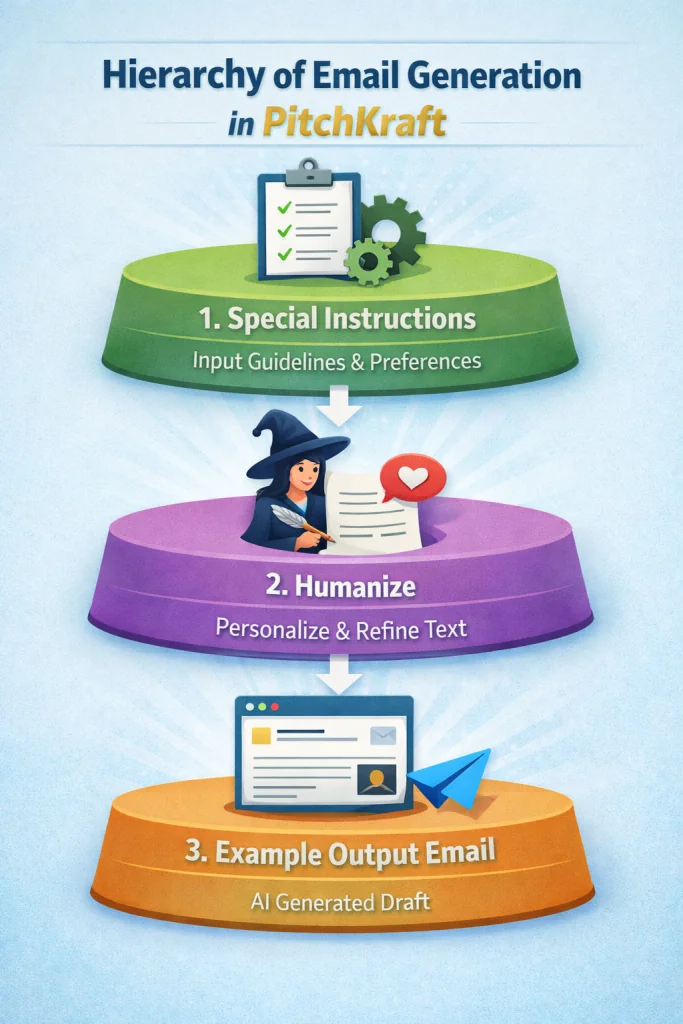
PitchKraft email generation hierarchy: Special Instructions, Humanize and Example Output Email.

Let’s talk about your personalised outreach

Get in touch with our PitchKraft specialists to discuss your email personalisation and outreach requirements.

Send us a message

Phone Support